Antigravity网络连接问题解决方案
之前通过CLI的方式可以使用google Agent,现在google公司推出了一个新的AI IDE,比肩Cursor、Trae等软件,我也是上手一用,但没成想第一个问题就是软件联网
TUN mode
TUN模式(Tunnel Mode)是一种虚拟网络技术,它在操作系统内核中创建一个虚拟网卡,将所有网络流量(包括TCP和UDP)重定向到用户空间的代理程序进行处理,实现对系统所有应用流量的“全局”捕获和代理。
但使用这个软件的首先拦路虎就是登录软件,我在实验室与家里电脑都安装了一个Antigravity软件,实验室电脑在使用clash开启TUN mode后,可以顺利认证跳转并使用,但家里的电脑就没这么顺利了。
开启TUN mode后,软件依然在尝试直连,最后显示处于offline的状态无法登录,TUNmode无法发挥作用。
命令行强制走代理
使用Gemini给我的第一个方案:直接命令行强制antigravity走代理:
$env:HTTP_PROXY="http://127.0.0.1:7890"
$env:HTTPS_PROXY="http://127.0.0.1:7890"
& "C:\Path\To\Antigravity.exe"但出现了如下runtime error的问题
TypeError: fetch failed
    at node:internal/deps/undici/undici:13510:13
    at process.processTicksAndRejections (node:internal/process/task_queues:105:5)
    at async GJe.w (file:///E:/Tools/work/code/Antigravity/resources/app/out/main.js:238:215165)
    at async ben.g (file:///E:/Tools/work/code/Antigravity/resources/app/out/main.js:238:209242)
    at async Timeout.n [as _onTimeout] (file:///E:/Tools/work/code/Antigravity/resources/app/out/main.js:238:209530) {
  [cause]: ConnectTimeoutError: Connect Timeout Error (attempted addresses: 142.250.66.74:443, 142.250.204.42:443, 142.250.196.202:443, 142.250.77.10:443, 142.250.198.74:443, timeout: 10000ms)
      at onConnectTimeout (node:internal/deps/undici/undici:2602:28)
      at Immediate._onImmediate (node:internal/deps/undici/undici:2568:35)
      at process.processImmediate (node:internal/timers:485:21) {
    code: 'UND_ERR_CONNECT_TIMEOUT'
  }
}
[main 2026-01-09T16:03:22.619Z] Failed to fetch NUXes: TypeError: fetch failed
    at node:internal/deps/undici/undici:13510:13
    at process.processTicksAndRejections (node:internal/process/task_queues:105:5)
    at async GJe.w (file:///E:/Tools/work/code/Antigravity/resources/app/out/main.js:238:215165)
    at async ben.g (file:///E:/Tools/work/code/Antigravity/resources/app/out/main.js:238:209242)
at async Timeout.n [as _onTimeout]gemini指出报错来源:node:internal/deps/undici 是软件后台主进程的连接出现了问题,之后哈吉米向我建议了一系列骚操作:软件快捷方式的目标添加--proxy-server="http://127.0.0.1:7890";为Antigravity的settings.json添加"http.proxy": "http://127.0.0.1:7890", 设置"http.proxyStrictSSL": false 均没有任何效果,无奈,只能通过知乎网友分享的方案,使用Proxifier强制代理。
Proxifier
按照文章1的方法,在Proxifier的Servers中添加HTTPS类型的代理本地端口,又为antigravity配置了规则,再打开antigravity,输出为
[01.10 01:12:50] antigravity.exe - www.google.com:443 close, 517 bytes sent, 0 bytes received, lifetime <1 sec
[01.10 01:12:50] antigravity.exe - www.google.com:443 close, 517 bytes sent, 0 bytes received, lifetime <1 sec
[01.10 01:13:15] antigravity.exe - play.googleapis.com:443 open through proxy 127.0.0.1:7890 HTTPS
[01.10 01:13:16] antigravity.exe - play.googleapis.com:443 close, 25692 bytes (25.0 KB) sent, 5726 bytes (5.59 KB) received, lifetime <1 sec
[01.10 01:13:16] antigravity.exe - antigravity-auto-updater-974169037036.us-central1.run.app:443 close, 3285 bytes (3.20 KB) sent, 9829 bytes (9.59 KB) received, lifetime <1 sec
[01.10 01:13:16] antigravity.exe - browser.events.data.microsoft.com:443 close, 654138 bytes (638 KB) sent, 9638 bytes (9.41 KB) received, lifetime <1 sec
[01.10 01:13:22] antigravity.exe - www.googleapis.com:443 open through proxy 127.0.0.1:7890 HTTPS
[01.10 01:13:22] antigravity.exe - www.googleapis.com:443 open through proxy 127.0.0.1:7890 HTTPS
[01.10 01:13:22] antigravity.exe - www.googleapis.com:443 open through proxy 127.0.0.1:7890 HTTPS
[01.10 01:13:22] antigravity.exe - www.googleapis.com:443 open through proxy 127.0.0.1:7890 HTTPS
[01.10 01:13:27] antigravity.exe - www.googleapis.com:443 close, 1125 bytes (1.09 KB) sent, 5884 bytes (5.74 KB) received, lifetime <1 sec
[01.10 01:13:27] antigravity.exe - www.googleapis.com:443 close, 1220 bytes (1.19 KB) sent, 7768 bytes (7.58 KB) received, lifetime <1 sec
[01.10 01:13:27] antigravity.exe - www.googleapis.com:443 close, 1364 bytes (1.33 KB) sent, 6944 bytes (6.78 KB) received, lifetime <1 sec
[01.10 01:13:29] antigravity.exe - www.googleapis.com:443 close, 1780 bytes (1.73 KB) sent, 7092 bytes (6.92 KB) received, lifetime <1 sec可以看到www.google.com流量为0,通过Profile -> Name Resolution 取消勾选Detect DNS settings automatically并选中Resolve hostnames through proxy 可以正常连接(可能这一步不重要)
之后认证时,有输出为
[01.10 01:26:51] antigravity.exe - daily-cloudcode-pa.googleapis.com:443 open through proxy 127.0.0.1:7890 HTTPS
[01.10 01:26:51] antigravity.exe - www.googleapis.com:443 open through proxy 127.0.0.1:7890 HTTPS
[01.10 01:26:51] antigravity.exe - daily-cloudcode-pa.googleapis.com:443 open through proxy 127.0.0.1:7890 HTTPS
[01.10 01:26:51] antigravity.exe - daily-cloudcode-pa.googleapis.com:443 open through proxy 127.0.0.1:7890 HTTPS
[01.10 01:26:56] antigravity.exe - www.googleapis.com:443 close, 1125 bytes (1.09 KB) sent, 6074 bytes (5.93 KB) received, lifetime <1 sec
[01.10 01:26:56] antigravity.exe - daily-cloudcode-pa.googleapis.com:443 close, 1220 bytes (1.19 KB) sent, 7613 bytes (7.43 KB) received, lifetime <1 sec
[01.10 01:26:56] antigravity.exe - daily-cloudcode-pa.googleapis.com:443 close, 1364 bytes (1.33 KB) sent, 6840 bytes (6.67 KB) received, lifetime <1 sec
[01.10 01:26:58] antigravity.exe - daily-cloudcode-pa.googleapis.com:443 close, 1780 bytes (1.73 KB) sent, 7102 bytes (6.93 KB) received, lifetime <1 sec
[01.10 01:27:15] antigravity.exe - oauth2.googleapis.com:443 open through proxy 127.0.0.1:7890 HTTPS
[01.10 01:27:15] antigravity.exe - daily-cloudcode-pa.googleapis.com:443 open through proxy 127.0.0.1:7890 HTTPS
[01.10 01:27:17] antigravity.exe - www.googleapis.com:443 open through proxy 127.0.0.1:7890 HTTPS
[01.10 01:27:17] antigravity.exe - daily-cloudcode-pa.googleapis.com:443 open through proxy 127.0.0.1:7890 HTTPS
[01.10 01:27:17] antigravity.exe - daily-cloudcode-pa.googleapis.com:443 open through proxy 127.0.0.1:7890 HTTPS
[01.10 01:27:20] antigravity.exe - oauth2.googleapis.com:443 close, 957 bytes sent, 7047 bytes (6.88 KB) received, lifetime <1 sec
[01.10 01:27:22] antigravity.exe - daily-cloudcode-pa.googleapis.com:443 close, 2849 bytes (2.78 KB) sent, 8718 bytes (8.51 KB) received, lifetime <1 sec可以看到oauth2.googleapis.com可以正常连接,而daily-cloudcode也可以正常连接,但依然无法跳转连接,这就很奇怪了。在查看账号归属地没有问题后,gemini建议我检查 Windows Hosts 文件,进入C:\Windows\System32\drivers\etc\hosts果然看到127.0.0.1 localhost这一行被注释了,导致localhost解析失败,之后再次重启antigravity,出现如下报错:
[01.10 01:48:51] antigravity.exe - www.googleapis.com:443 close, 1125 bytes (1.09 KB) sent, 6047 bytes (5.90 KB) received, lifetime <1 sec
[01.10 01:48:51] language_server_windows_x64.exe - antigravity-unleash.goog:443 close, 3237 bytes (3.16 KB) sent, 72861 bytes (71.1 KB) received, lifetime <1 sec
[01.10 01:48:51] antigravity.exe - daily-cloudcode-pa.googleapis.com:443 close, 1220 bytes (1.19 KB) sent, 7605 bytes (7.42 KB) received, lifetime <1 sec
[01.10 01:48:51] antigravity.exe - daily-cloudcode-pa.googleapis.com:443 close, 1364 bytes (1.33 KB) sent, 7031 bytes (6.86 KB) received, lifetime <1 sec
[01.10 01:48:53] antigravity.exe - daily-cloudcode-pa.googleapis.com:443 close, 1780 bytes (1.73 KB) sent, 7170 bytes (7.00 KB) received, lifetime <1 sec
[01.10 01:49:10] language_server_windows_x64.exe (31592) - www.googleapis.com(142.250.196.202):443 error : Could not connect to www.googleapis.com(142.250.196.202):443 - connection attempt failed with error 10060
[01.10 01:49:10] language_server_windows_x64.exe (31592) - daily-cloudcode-pa.googleapis.com(142.250.198.74):443 error : Could not connect to daily-cloudcode-pa.googleapis.com(142.250.198.74):443 - connection attempt failed with error 10060可以看到antigravity.exe可以正常走代理,并有数据发送与接收,而language_server_windows_x64.exe则使用直连并发送失败,由于规则只添加了antigravity,导致出现了漏网之鱼,按照如下方式添加:
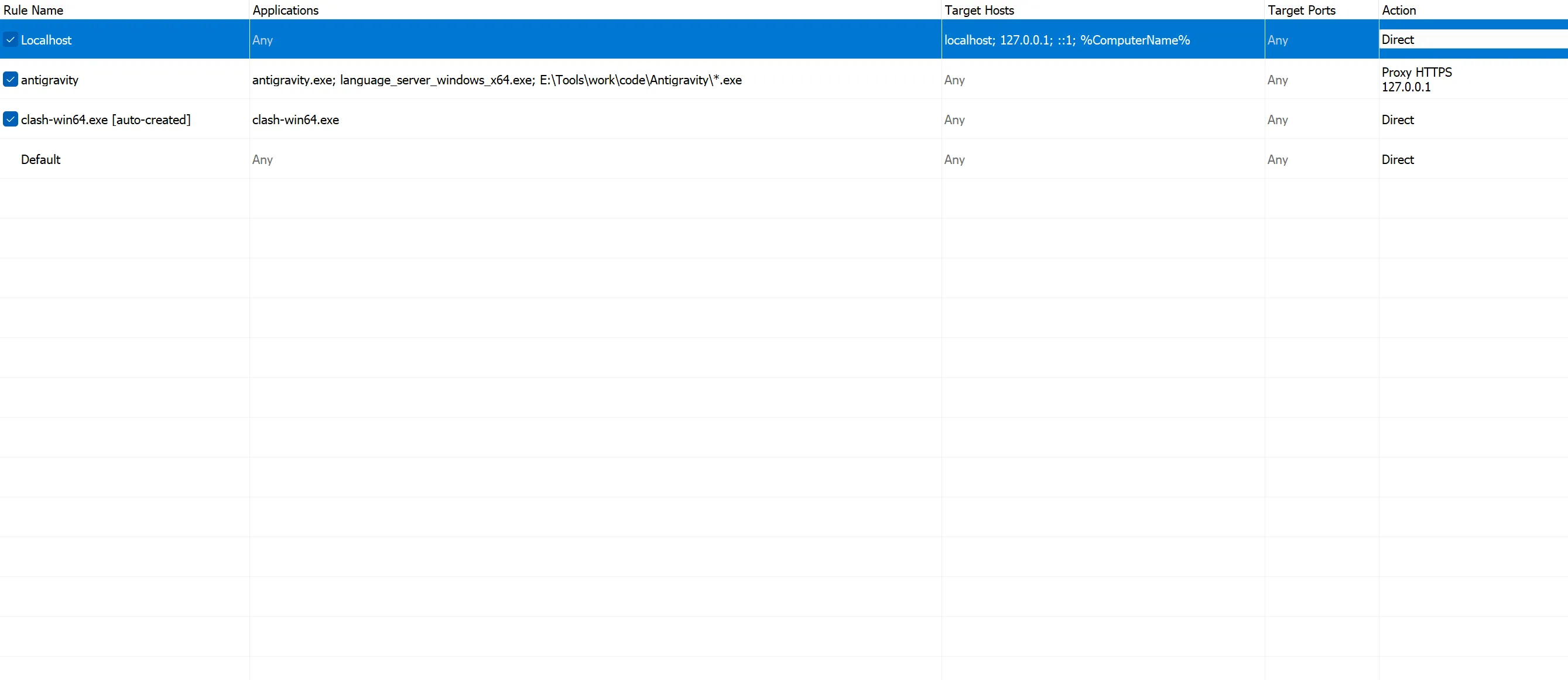 再次运行后可以正常连接:
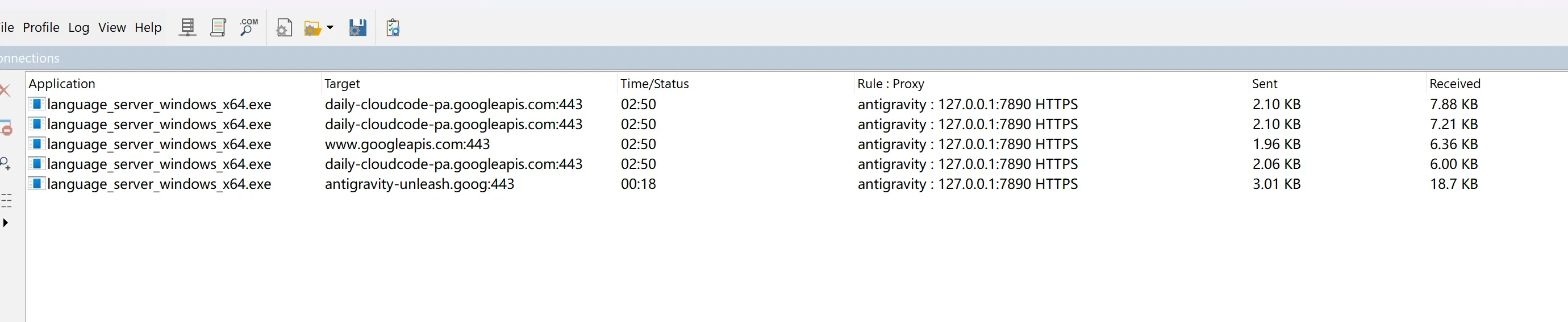
TUN mode 修复
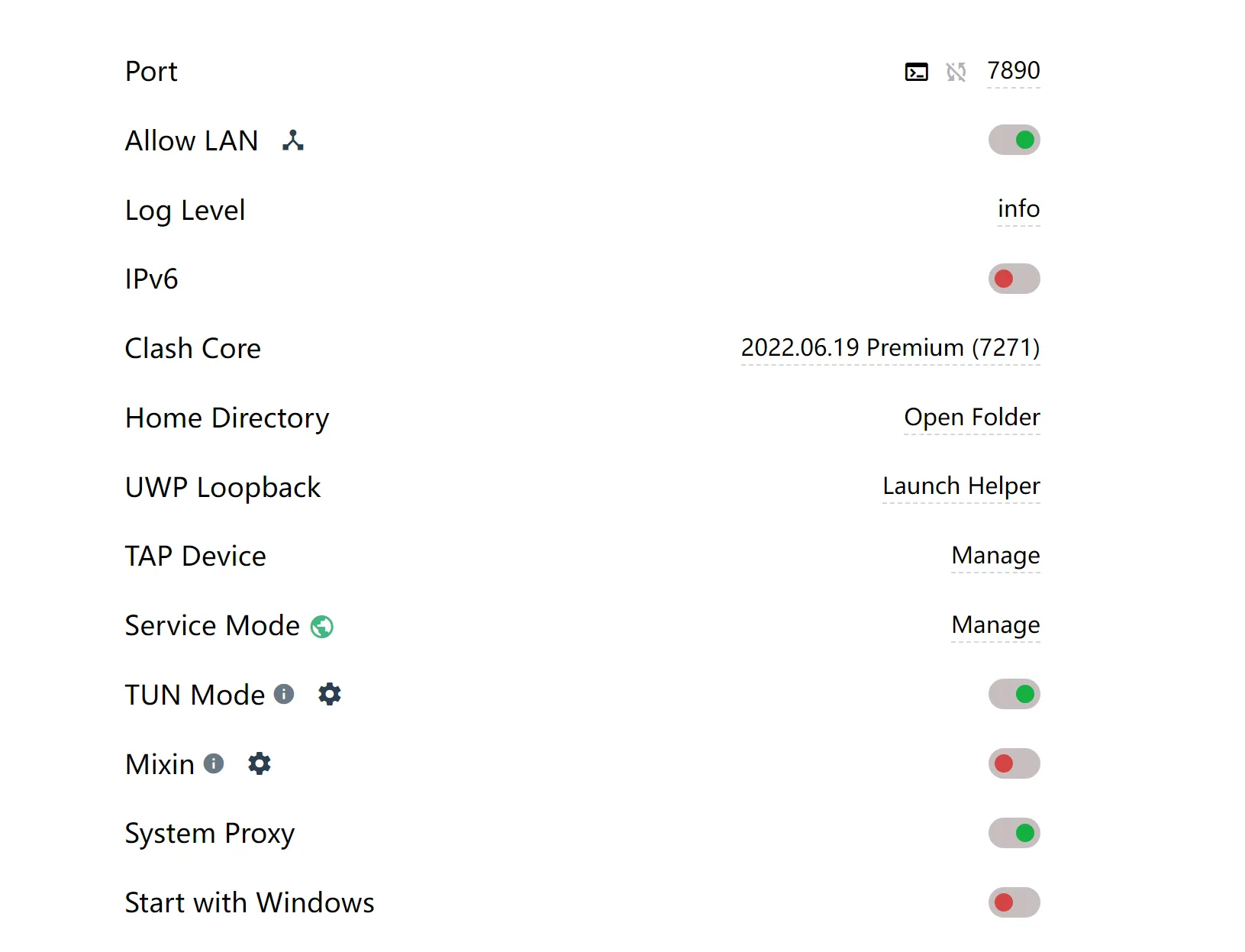
之前TUN mode不可用是因为没有为clash安装Service Mode,Service Mode 本质上是一个安装在 Windows 系统底层的“后台服务” (Windows Service)。没有Service Mode,系统的核心网络设置就不会被Clash修改。
安装Service Mode后,即可正常在Antigravity中使用代理服务。